ghost-toc
Ghost TOC
A lightweight, customizable Table of Contents generator for Ghost blog platform.
Note: While designed specifically for Ghost, this script will work on any webpage that has an
<article>tag containing heading elements (H2-H6). The Ghost-specific features include filtering out Ghost’s author name heading and integration with Ghost’s code injection system.
Preview
| 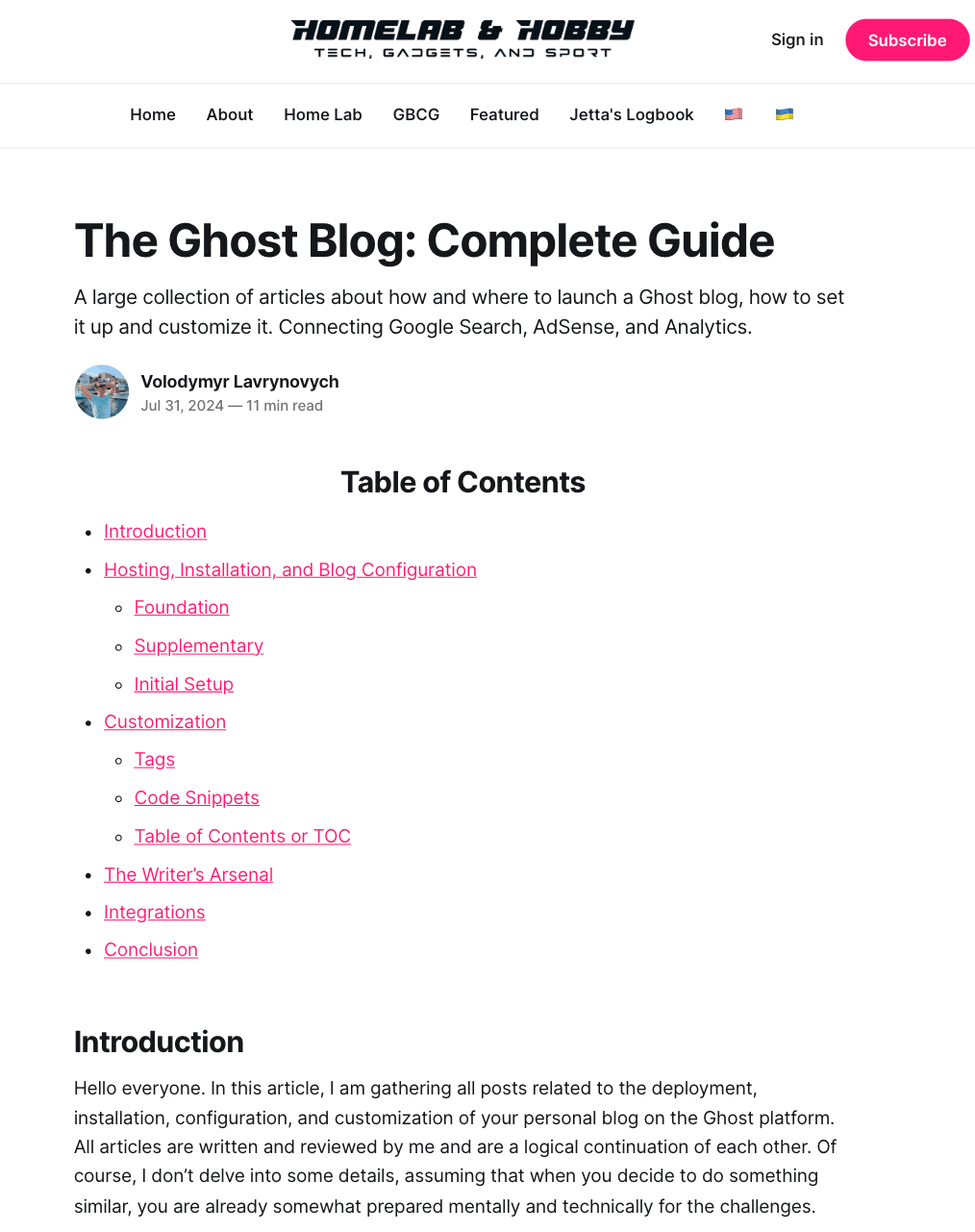 | See it in action
Ghost TOC automatically generates a hierarchical table of contents from your article headings.
Features shown:
• Clean, minimal design
• Hierarchical structure (H2, H3)
• Clickable navigation links
• Customizable title |
|—–|—–|
Features
- 🚀 Automatic TOC generation from article headings (H2-H6)
- 🎨 Customizable styling with border and background colors
- 📱 Collapsible functionality with show/hide toggle
- 💾 State persistence - remembers collapsed/expanded preference
- 🎯 Heading level filtering - choose which levels to include
- 🚫 Exclude specific headings by ID
- 📝 Multiple list styles - bullets, numbers, or none
- 🎨 Custom CSS classes for advanced styling
- 🔗 Smooth anchor navigation
- ♿ Screen reader accessible with ARIA attributes
- 💪 Zero dependencies
- 📦 Lightweight (~3KB minified)
- 🌍 Multi-language support via customizable title attribute
- 🔄 Single point of maintenance - update once, apply everywhere
- 💾 Reduces database size - no script duplication across posts
Installation
Using Code Injection (Recommended)
- Go to your Ghost Admin panel
- Navigate to Settings → Code Injection
- In the Site Footer section, copy and paste the content from
dist/ghost-toc.min.js - Click Save
Manual Installation
Download the dist/ghost-toc.min.js file and include it in your Ghost theme’s footer.
📖 For detailed installation instructions with pro tips, see INSTALLATION.md
⚡ Want to get started quickly? Check out the Quick Start Guide
Usage
Basic Usage
Add the <toc> tag anywhere in your Ghost article where you want the table of contents to appear:
<toc title="Table of Contents"></toc>
Collapsible TOC
Create a collapsible table of contents with custom styling:
<toc
  title="Table of Contents"
  collapsible="true"
  show-text="Show"
  hide-text="Hide"
  border-color="gainsboro"
  bg-color="aliceblue">
</toc>
Configuration Options
| Attribute | Type | Default | Description |
|---|---|---|---|
title |
string | - | Title displayed at the top of TOC |
collapsible |
boolean | false |
Enable collapsible functionality |
show-text |
string | "Show" |
Text for expand button |
hide-text |
string | "Hide" |
Text for collapse button |
default-state |
string | "expanded" |
Initial state for collapsible TOC (collapsed or expanded) |
levels |
string | "2,3,4,5,6" |
Comma-separated heading levels to include (e.g., "2,3" for H2 and H3 only) |
class |
string | - | Custom CSS classes to add to TOC container |
remember-state |
boolean | false |
Persist TOC state in localStorage across page loads |
list-style |
string | "bullets" |
List marker style (bullets, numbers, or none) |
exclude |
string | - | Comma-separated heading IDs to exclude from TOC |
border-color |
string | "gainsboro" |
Border color for collapsible TOC |
bg-color |
string | "aliceblue" |
Background color for collapsible TOC |
🎨 Want more customization options? See the Customization Guide
How It Works
Ghost TOC automatically:
- Scans your article for heading elements (H2-H6)
- Filters out Ghost’s default author name heading
- Validates that headings have
idattributes (skips those without, logs warning) - Builds a hierarchical navigation structure
- Generates clickable links with anchor navigation
- Applies custom styling based on your configuration
- Adds ARIA attributes for screen reader accessibility
Examples
See the examples/ directory for complete implementation examples:
- Basic Example - Simple TOC with title
- Collapsible Example - Advanced TOC with collapse functionality
- Full Customization Example - Complete example using all available configuration options
- v2.3 Features Demo - Showcases new v2.3.0 features (state management, filtering, custom classes)
Why Use Ghost TOC?
Traditional Approach Problems
- ❌ Script duplicated in every single post
- ❌ Database bloat from repeated code
- ❌ Updating requires editing all posts manually
- ❌ Inconsistent behavior across posts
Ghost TOC Benefits
- ✅ One-Time Setup: Install script once in footer, use everywhere
- ✅ Database Efficient: Only a small
<toc>tag per post - ✅ Easy Updates: Change footer script, all posts update automatically
- ✅ Consistent Experience: Same behavior across your entire blog
- ✅ Multi-language Ready: Different titles for different language versions
Real-World Use Cases
Technical Blogs
Long tutorials and documentation benefit from hierarchical navigation through complex topics.
Multi-language Sites
Easily customize TOC titles per language without maintaining separate scripts:
<!-- English post -->
<toc title="Table of Contents"></toc>

<!-- Spanish post -->
<toc title="Tabla de Contenidos"></toc>
Long-form Content
Articles with multiple sections become more navigable and user-friendly.
Documentation Sites
Perfect for Ghost-powered documentation with structured content.
The Story Behind Ghost TOC
Ghost TOC was born from a simple frustration: Ghost didn’t have built-in table of contents functionality, and the existing solutions weren’t good enough.
The Problem (2024)
When writing comprehensive articles, I needed a way to help readers navigate through sections. Manual TOCs were tedious and error-prone—every time you changed a heading, you had to update the links. The recommended solution, Tocbot, had its own issues:
- Only worked in sidebars, limiting design flexibility
- Required loading external dependencies from CDNs
- Needed direct server file modifications (default.hbs, post.hbs) that many Ghost users couldn’t access
There had to be a better way.
Version 1.0 - The Beginning
The first version (v1.0 Gist, blog post) solved the core problem:
- ✅ Pure JavaScript—no external dependencies
- ✅ Works anywhere in your post, not just sidebars
- ✅ Installed via Ghost’s Code Injection (no server access needed)
- ✅ Simple
<toc>tag in your posts - 📝 Supported H2 and H3 headings (2 levels)
But there was a catch: the script had to be duplicated in every single post. This meant database bloat and maintenance headaches when updates were needed.
Version 2.0 - The Evolution
V2 (v2.1 Gist, blog post) revolutionized the approach:
- 🔄 One script in the footer, unlimited use in posts—just add the
<toc>tag where needed - 📊 Full heading hierarchy (H2-H6) added in May 2024
- 📱 Collapsible functionality added in December 2024
- 🌍 Multi-language support through customizable titles
- 💾 Database efficiency—no more duplicated code
Today - The Repository
What started as a Gist has grown into a full-fledged project with:
- 🏗️ Automated build system with minification
- 📚 Comprehensive documentation and examples
- 🎨 Advanced customization options
- 🌐 Compatibility beyond Ghost (works on any HTML page)
Ghost TOC proves that sometimes the best solutions come from scratching your own itch. What began as a simple workaround is now used by bloggers worldwide to make their content more navigable and user-friendly.
Migration from Gist
If you’re currently using the Gist version, simply replace it with the code from this repository’s dist/ghost-toc.min.js file. The API and functionality remain the same - no changes needed to your <toc> tags!
Using Outside of Ghost
While Ghost TOC is designed for the Ghost platform, it can be used on any website with the following requirements:
Requirements
- Your page must have an
<article>tag containing your content - Headings must be properly structured (H2-H6) with
idattributes for anchor links- Note: Headings without
idattributes will be automatically skipped with a console warning
- Note: Headings without
- Include the script before the closing
</body>tag
Generic HTML Usage
<!DOCTYPE html>
<html>
<head>
    <title>My Article</title>
</head>
<body>
    <article>
        <toc title="Table of Contents"></toc>

        <h2 id="section-1">Section 1</h2>
        <p>Content here...</p>

        <h3 id="subsection-1-1">Subsection 1.1</h3>
        <p>More content...</p>

        <h2 id="section-2">Section 2</h2>
        <p>Content here...</p>
    </article>

    <script src="path/to/ghost-toc.js"></script>
</body>
</html>
WordPress, Drupal, or Static Sites
Simply include the script in your theme’s footer and add the <toc> tag where needed. Most modern CMS platforms automatically generate heading IDs, making this script compatible out of the box.
Development
Building from Source
To build the minified distribution file from source:
# Install dependencies
npm install

# Build minified version
npm run build
This will minify src/ghost-toc.js and output to dist/ghost-toc.min.js.
Automated Workflows
GitHub Actions automatically handles builds:
- Auto Build: When you push changes to
src/, the minified file is automatically rebuilt and committed - Release: When you create a GitHub release, the minified file is automatically attached as a downloadable asset
See .github/workflows/README.md for details.
For detailed build instructions, see BUILD.md.
Project Structure
ghost-toc/
├── src/
│   └── ghost-toc.js              # Source code (edit this)
├── dist/
│   └── ghost-toc.min.js          # Minified distribution (auto-generated)
├── docs/                         # Documentation
├── examples/                     # Working examples
└── scripts/                      # Build scripts
License & Credits
License: MIT License - see LICENSE file for details
Author: Volodymyr Lavrynovych
Community:
- Ghost Forum Discussion - Share feedback and questions
- GitHub Issues - Report bugs or request features